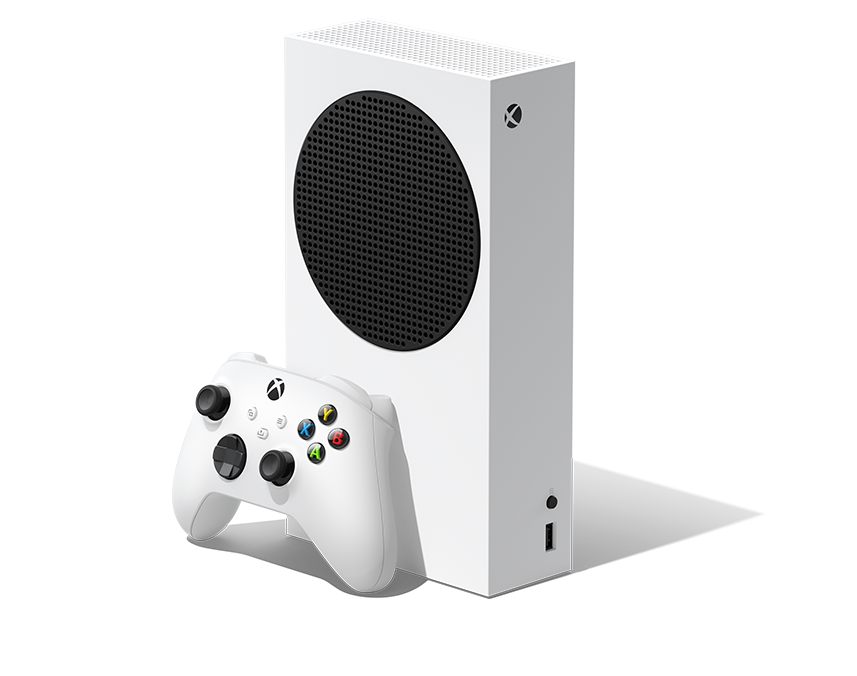
The Xbox Series S is Microsoft’s compact, all-digital current-generation console. This guide covers the 512GB Robot White configuration shown in the catalog listing. The linked Amazon offer is marked Renewed and its title mentions a Type-C hub and USB extension cable; those may be seller-added bundle items. Check the listing’s seller, condition, warranty and exact box contents before buying.
What the 512GB Series S offers
- All-digital games: it has no disc drive, so physical Xbox game discs cannot be played. Digital backward-compatible games you own can appear in the Ready to Install library when they are part of the supported catalog.
- 1440p gaming target: Xbox lists 1440p as the gaming resolution, with the ability to upscale to 4K. Supported games and displays can reach frame rates of up to 120 FPS; that is a maximum capability, not a guarantee for every game.
- Custom SSD and Quick Resume: the console uses a custom NVMe SSD and Xbox Velocity Architecture for faster loading and switching among supported games.
- 512GB internal storage: this Robot White version has a 512GB custom NVMe SSD. Game installs and system files use storage, so the amount available for games is lower than the advertised capacity.
- Hardware: Xbox lists an 8-core custom Zen 2 CPU, a custom RDNA 2 GPU rated at 4 TFLOPS, 10GB of GDDR6 memory, and one HDMI 2.1 port.
What is included
Microsoft’s standard 512GB Series S package includes the console, one Robot White Xbox Wireless Controller, an Ultra High Speed HDMI cable and a power cord. The Amazon catalog entry is a renewed offer with additional accessories named in its title. Microsoft’s standard package list does not verify those add-ons, so check the seller’s current contents and condition details.
Compatibility and storage
Series S plays digital games selected from the supported Xbox library, including backward-compatible titles. It cannot use disc-based games. Xbox says Series X|S consoles work with most Xbox One controllers and gaming accessories. For expansion, Microsoft supports a dedicated Storage Expansion Card that matches internal storage performance; a USB external drive is another supported storage option. Check each game’s storage requirements before choosing a drive.
First-time setup
- Connect the console to the display with the included HDMI cable, then connect its power cord.
- Turn on the console, select the matching HDMI input on the display and follow the on-screen setup.
- Connect to the internet, sign in with the Microsoft account used for digital purchases, and install available system updates.
- Install a digital game from the library or Microsoft Store. Review the available storage before downloading large games.
Before choosing this listing
This is the right Series S configuration for someone who wants a small, disc-free console and expects to buy or download games digitally. Choose a disc-drive console if you need to play physical Xbox games. Because this catalog offer is marked renewed, confirm the refurbisher, cosmetic condition, return window, warranty, included controller and cable, and whether the advertised hub and extension cable are actually included.
View the Xbox Series S 512GB Renewed catalog offer on Amazon. We may earn a commission from qualifying purchases at no extra cost to you. Listing price and availability can change.
Comparing capacities and finishes? See our Xbox Series S 1TB Carbon Black guide.